A Practical AI Guide for Educators
Use AI to Take the Busywork Out of Teaching — Without Giving Up Your Professional Judgment
A practical playbook for using AI in lesson planning, differentiation, assessment, feedback, family communication, and admin — built around repeatable workflows, not random prompts.
Instant digital access · PDF download after checkout
Teachers Don't Need More AI Prompts. They Need a Better System.
You can find thousands of AI prompts online, but a prompt alone doesn't know your learners, your curriculum, or your school's policies. It can produce something that looks useful and still needs checking, refining, and your professional judgment before it reaches a student.
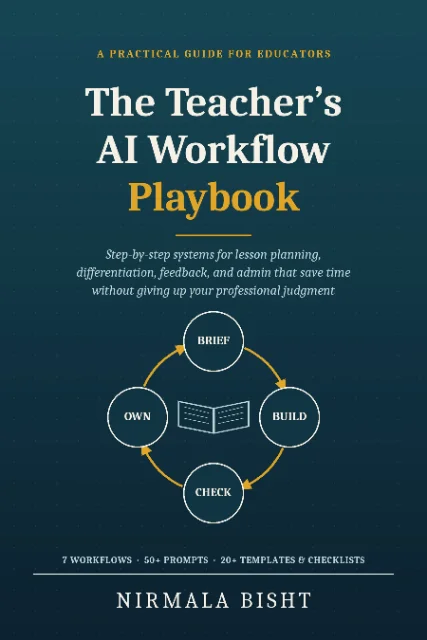
The Core System
One loop runs through every workflow in the book.
Learn it once, and you can apply it to almost any repetitive teaching task.
01 · BRIEF
You lead
Give AI clear context: your learners, your goal, your curriculum, and any limits.
02 · BUILD
AI drafts, you steer
AI creates a first draft. You refine it through short follow-up requests.
03 · CHECK
You verify
Check accuracy, appropriateness, alignment, fairness, privacy, and policy fit.
04 · OWN
You decide
Make the final edits, add your professional knowledge, and decide whether to use it.
“AI drafts. Teachers decide.”Outsource the doing, not the thinking.
Inside the Playbook
Seven complete workflows, each with a step-by-step process, a worked example, adaptable prompts, and a checklist.
Unit & Lesson Planning
Plan lessons around objectives, success criteria, activities, checks, and realistic timings.
Differentiation & Accessible Materials
Create different versions while keeping the same learning goal.
Assessment Design
Create purposeful quizzes, question banks, rubrics, and diagnostic exit tickets.
Feedback That Stays Human
Use AI to support comment banks and whole-class feedback without handing over judgment.
Communication with Families
Draft clearer, warmer newsletters, updates, and routine messages.
Admin & Organization
Turn notes into minutes, build calendars and checklists, summarize documents, and analyze anonymized data.
Teaching Students to Use AI Well
Help students understand responsible AI use, AI-use levels, verification, and academic integrity.
What You Get
Everything is organized so you can find what you need without flipping through chapters.
From “Write Me a Lesson Plan” to a Repeatable Teaching Workflow
The difference isn't the AI tool. It's the quality of the brief you give it.
Before — a bare prompt
“Make a quiz about fractions.”
Vague on its own. The AI has to guess the grade level, the standards, and what students already struggle with — so it usually guesses generic.
After — a Five-Part Teacher Brief
“I teach Grade 4, Common Core math. Mixed ability, several still shaky on equivalent fractions. They've just finished comparing fractions with different denominators. Create an 8-question quiz — 5 multiple-choice, 3 short-answer. Make wrong options reflect common mistakes. Use diverse names and realistic contexts. Include an answer key.”
One extra minute of context. A first draft that actually lands close to what you need.
A Foundational System in the Book
The Five-Part Teacher Brief
Everything you'd tell a substitute teacher before handing off a task — turned into a reusable structure for AI.
LEARNERS
Who is this for?
GOAL
What should students know or be able to do?
CONTEXT
What curriculum, prior learning, or constraints matter?
OUTPUT
What exactly should AI produce, in what format?
LIMITS
What should it include or avoid?
Responsible AI Use, Built In
The playbook doesn't encourage blind automation. It teaches you to protect student privacy, verify AI output, and keep people in charge of decisions about people.
The book's traffic-light guide for deciding how AI should be used:
Green · Draft Freely
Brainstorming lesson ideas, practice questions, examples and analogies, reformatting materials, newsletters.
Amber · Draft With Close Review
Feedback comments, report card comment drafts, routine parent emails, differentiated materials, rubrics.
Red · Human Only
Final grades, placement or streaming decisions, behavior or discipline decisions, safeguarding matters, special education decisions, sensitive family communications.
Don't Just Read About AI. Build One Workflow at a Time.
The book includes a 30-day plan built around roughly 15–20 minutes on most school days. It starts small and adds one workflow at a time. Results will vary — the plan won't promise you a specific number of hours saved.
WEEK 1
Set up and start small
Choose your tool, stay safe, complete one green task a day.
WEEK 2
Run your first full workflow
Pick the workflow that matches your biggest time drain, start to finish.
WEEK 3
Add a second workflow
Build a second habit — differentiation or assessment work well here.
WEEK 4
Communication, admin, reflection
Round out your toolkit, then reflect on what to keep, adjust, or drop.
Built for Teachers, Not Tech Experts
You don't need coding knowledge. You don't need to understand how large language models work. You don't need ten different AI subscriptions.
You need a practical system for using AI thoughtfully in the work you already do.
Customer Reviews
What Educators Are Saying
AI-generated illustrative profiles and sample feedback — not verified customer testimonials.
Use the left and right arrow keys to move between reviews. Use Home for the first review and End for the last.

“As a primary teacher, this playbook changed my lesson planning. Using the guided prompts, I now create engaging environmental studies activities in minutes rather than hours. It gives me more time to focus on my students' individual growth.”

“The section on differentiation is brilliant for my secondary math classes. I can now generate multiple versions of complex word problems that cater to different skill levels while ensuring the mathematical logic remains sound and rigorous.”

“For special education, safety and personalization are everything. This guide helped me use AI to adapt reading materials for neurodiverse learners while maintaining strict professional judgment over the content. It's an essential tool for inclusive classrooms.”

“As an instructional coach, I recommend this for its focus on better prompts. It helps teachers move beyond basic AI use to creating sophisticated, high-quality resources that truly align with our curriculum standards and pedagogical goals.”
Frequently Asked Questions
Start With One Workflow.
You don't need to transform your entire teaching practice overnight. Start with one repetitive task, build a workflow, check the output, make it yours, and build from there.
₹ 299Instant digital access · PDF download after checkoutPractical guidance, not hype. This playbook is teacher-centered and tool-neutral where possible, with a strong focus on privacy and responsible use. It does not promise guaranteed time savings — AI output should always be checked, and your school's policies always come first.